Installing Instiki on Debian
Aug 12. 05I decided it was about time I had a play with Instiki here at Bite CP since we used to have an install back at Mirashade.
On an unrelated note, Mirashade has been liquidated! I might post more on that another time.
Anyhow, back to the Instiki install. Before we can even go anywhere with Instiki we’ll need to install ‘Ruby’.
So log-in to your Debian box as root and type:
apt-get install ruby
With this done we also need to install some additional modules that Debian requires:
apt-get install ruby apt-get install libwebrick-ruby apt-get install libstrscan-ruby apt-get install rdoc apt-get install libzlib-ruby apt-get install libsoap-ruby1.8
Right, with that done let’s download the latest build of Instiki. Once this is done unzip the files and drop them into your ‘var/www’ folder. I created a parent folder called ‘Instiki’ to put them in.
Now from your linux command line navigate to the directory in which you have placed your instiki files and run:
ruby instiki.rb
Launch a suitable browser and enter the address of your linux box followed by a colon and ‘2500’.
For example: http://rooty:2500
You’ll now see a simple setup screen which asks you to provide a name and address for your web, and an administrative password.
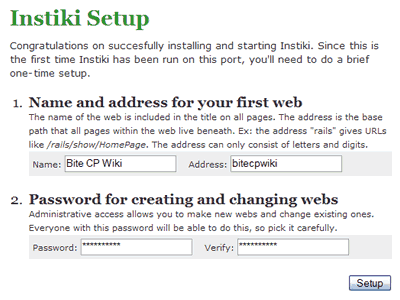
With this screen completed click ‘Setup’ and your settings are saved. Now you’ll be dumped on your Wiki home page in ‘edit’ mode. You can start building your Wiki now… but before you do… one last task to complete.
If like me you want Instiki to run as a daemon (Essentially means it runs in background) then you’ll need to do the following (Thanks for the pointer Jonathan)
Log back in as root and type:
nano /etc/init.d/bootmisc.sh
Scroll right down to the bottom of the file and add the follwoing line above the ‘exit’ command:
ruby /var/www/Instiki/instiki.rb -d
Now, reboot you Debian box and you’re good to go.